Excel track · Exercise 39 of 86 Paid
XLOOKUP: search from the bottom
Return the latest entry for a repeated key without sorting the log first.
Advanced
Activity log with repeat SKUs
Read-only data · screen 1 of 3 · answer in B7
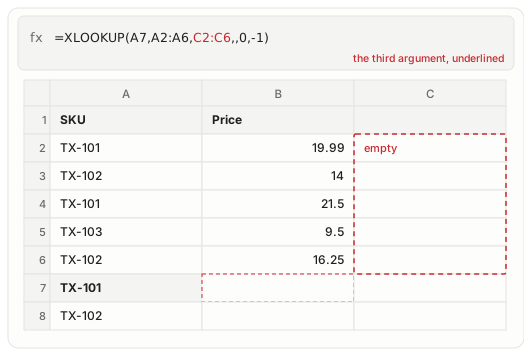
In B7, return the most recent price logged for the SKU in A7, which the log records twice.
| A | B | |
|---|---|---|
| 1 | SKU | Price |
| 2 | TX-101 | 19.99 |
| 3 | TX-102 | 14 |
| 4 | TX-101 | 21.5 |
| 5 | TX-103 | 9.5 |
| 6 | TX-102 | 16.25 |
| 7 | TX-101 | |
| 8 | TX-102 |
In B8, do the same for the SKU in A8, whose two entries are the second and the last in the log.
| A | B | |
|---|---|---|
| 1 | SKU | Price |
| 2 | TX-101 | 19.99 |
| 3 | TX-102 | 14 |
| 4 | TX-101 | 21.5 |
| 5 | TX-103 | 9.5 |
| 6 | TX-102 | 16.25 |
| 7 | TX-101 | |
| 8 | TX-102 |
The bar's third argument points at an empty column, so give it the range that holds the price.
Reference answer
What it does
The log is append-only, so the newest price for a SKU is the last row that names it. Search mode -1 walks the key column from the bottom until it finds one. TX-101 sits in rows 2 and 4, so the answer is the 21.5 in row 4.
The fourth and fifth arguments are skipped with empty commas, which puts -1 in the sixth slot. With the default direction the same formula returns 19.99: a real price from a real row, wrong only because it is the older entry.
Other routes reach 21.5 too, but each needs a sorted column or a date to compare against. This argument asks nothing of the sheet beyond the order it already has.
Syntax
=XLOOKUP(lookup_value, lookup_array, return_array, [if_not_found], [match_mode], [search_mode])Worked example
On Activity log with repeat SKUs, =XLOOKUP(A7,A2:A6,B2:B6,,0,-1) returns 21.5.
=XLOOKUP(A7,A2:A6,B2:B6,,0,-1)Common errors
| Error | What it means and how to fix it |
|---|---|
#N/A | The key is not in the searched range, which happens when the range points at the price column or stops before the last row. |
#VALUE! | The key range and the price range are different sizes, so a row in one has no partner in the other. |
At work
Price logs, stock movements and status changes where a key is written again later, and the newest row wins.