Excel track · Exercise 34 of 86 Paid
VLOOKUP: approximate match needs a sorted column
Read a rate off a band table with approximate match, on a column that rises.
Intermediate
Commission bands by revenue
Read-only data · screen 1 of 2 · answer in B6
In B6, look up the commission rate for the revenue in A6 across the bands in A2:B5, using approximate match.
| A | B | |
|---|---|---|
| 1 | Revenue | Rate |
| 2 | 0 | 0.02 |
| 3 | 1000 | 0.05 |
| 4 | 5000 | 0.08 |
| 5 | 10000 | 0.1 |
| 6 | 4200 |
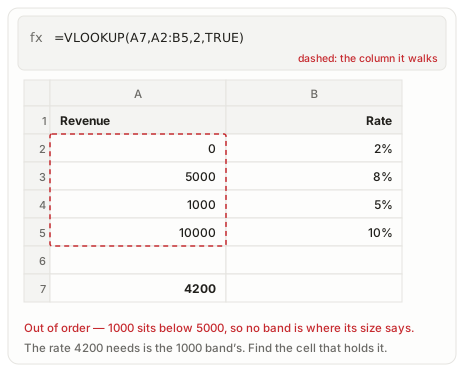
These bands are out of order, so which cell holds the rate that 4200 needs?
Reference answer
What it does
Approximate match walks the first column until the lookup value would pass, then steps back to the row it last cleared. That is why the bands rise: 4200 sits above the 1000 band in A3 and below 5000 in A4, so the formula returns the rate on the 1000 row, 0.05.
The fourth argument picks the mode. FALSE demands a band that starts at exactly 4200, and none does, so exact match answers #N/A. TRUE asks for the band below, and 1 means the same thing. The grader wants that argument written rather than implied.
A band table is only as good as its sort. Move 1000 under 5000 and the same formula stops on the wrong row.
Syntax
=VLOOKUP(lookup_value, table_array, col_index_num, [range_lookup])Worked example
On Commission bands by revenue, =VLOOKUP(A6,A2:B5,2,TRUE) returns 0.05.
=VLOOKUP(A6,A2:B5,2,TRUE)Common errors
| Error | What it means and how to fix it |
|---|---|
#N/A | The lookup value is below the first band, and VLOOKUP has no earlier row to step back to. |
#VALUE! | The column index is text rather than a number, which names no column to read. |
#REF! | The column index points past the right edge of A2:B5, which holds two columns. |
At work
Commission tiers, postage bands and tax brackets: tables written to be read approximately.